
What is schema markup? A guide for business websites
Schema markup is structured data that tells search engines what a page is about. This guide covers the types a business site needs, a LocalBusiness example and the mistakes to avoid.
Key points
- Schema markup is code, usually JSON-LD, that tells search engines in a fixed vocabulary what a page is about.
- For a business, the core types are Organization or LocalBusiness, WebSite, WebPage, Service, Article and Person.
- Markup must describe what is visible on the page. Markup that disagrees with the page can be ignored or penalized.
- Some rich results have narrowed: FAQ rich results now show mainly for government and health sites, and self-serving review stars are not shown for a business’s own reviews.
- The lasting value is entity clarity: one consistent, connected description of the business that search engines and AI systems can read.
What is schema markup?
Schema markup is structured data added to a web page that describes its content using the shared Schema.org vocabulary. It turns facts a person can read, such as a business name, address, opening hours, a price or an author, into labeled data a machine can read without guessing.
Google, Bing and other search engines use it to understand pages and, for some types, to show rich results such as breadcrumbs, product details or event dates. Google recommends the JSON-LD format, a block of code that sits in the page and does not change how it looks.
Which schema types does a business website need?
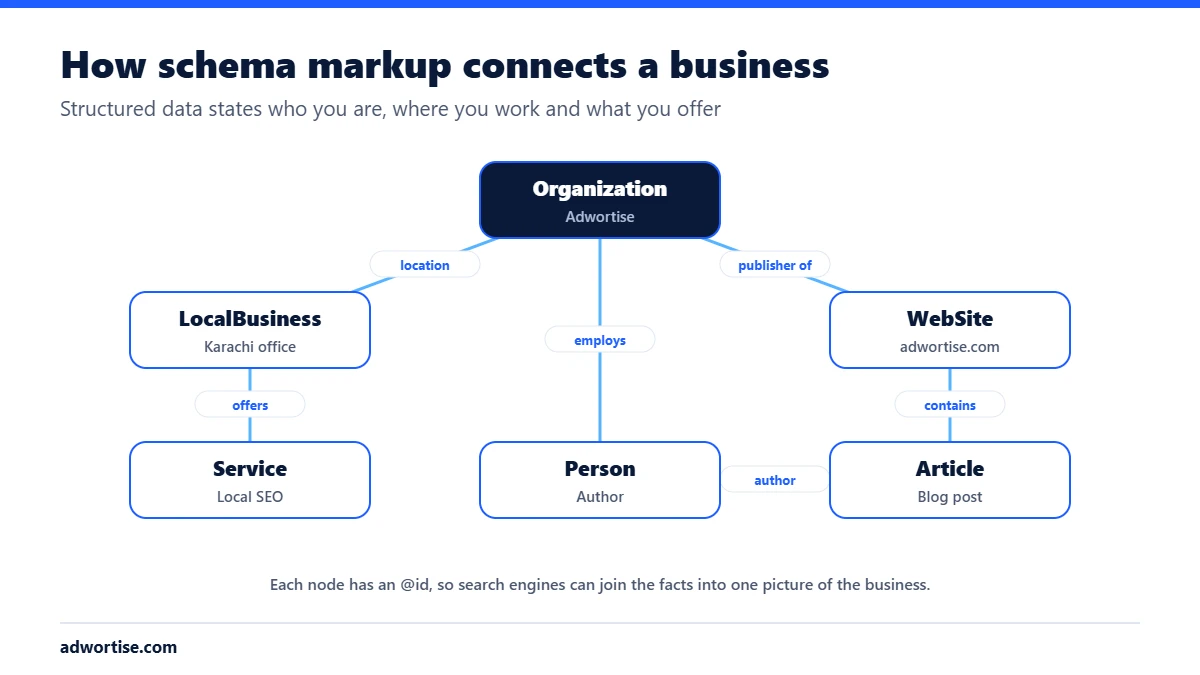
Most business websites need a small, connected set of types, not dozens. Each item gets an @id, a fixed web address that identifies it, so the items can refer to each other.
| Type | Where it goes | What it states |
|---|---|---|
| Organization | Every page, once | Name, logo, contact points, founders, social profiles (sameAs) |
| LocalBusiness or a subtype | Every page, or the location page | Address, phone, geo coordinates, hours, map link |
| WebSite and WebPage | Every page | What the page is and which site it belongs to |
| BreadcrumbList | Every page below the home page | Where the page sits in the site |
| Service | Service pages | The service, who provides it and where |
| Article or BlogPosting | Blog posts | Headline, dates, author and publisher |
| Person | Team page and articles | Name, job title, what they know about, employer |
Use the most specific LocalBusiness subtype that fits, such as Plumber, Dentist or LegalService. Schema.org lists the subtypes.
What does LocalBusiness schema look like?
Here is a minimal example for a plumber. Every value matches something a visitor can see on the page.
<script type="application/ld+json">
{
  "@context": "https://schema.org",
  "@type": "Plumber",
  "@id": "https://example.com/#business",
  "name": "Example Plumbing",
  "url": "https://example.com/",
  "telephone": "+1-555-010-0000",
  "address": {
    "@type": "PostalAddress",
    "streetAddress": "100 Main Street",
    "addressLocality": "Austin",
    "addressRegion": "TX",
    "postalCode": "78701",
    "addressCountry": "US"
  },
  "areaServed": "Austin, TX",
  "openingHours": "Mo-Fr 08:00-18:00",
  "sameAs": ["https://www.facebook.com/exampleplumbing"]
}
</script>
Add the business’s other details, such as logo, geo coordinates and a hasMap link to its Business Profile, when they are also on the page.
How do you add schema markup to a website?
- Write down the facts. The exact business name, address, phone, hours, services, people and profiles, as they appear on the site and the Business Profile.
- Choose the types from the table above for each template: home, service, location, article, team.
- Generate JSON-LD. An SEO plugin can do the basics on WordPress. Custom themes can output it from the same fields that fill the page, so the two never disagree.
- Connect the items with @id. The article’s author points to the Person, the Person works for the Organization, the LocalBusiness belongs to the Organization.
- Test. Use Google’s Rich Results Test for eligible features and the Schema Markup Validator for everything else.
- Monitor. Search Console reports errors for supported types under Enhancements.
Does schema markup help with AI search?
It helps indirectly. AI answers draw on sources they can understand and trust, and a site that states its facts consistently, on the page, in its markup and across other websites, is easier to understand. Schema is one part of that consistency, alongside clear writing and matching business details elsewhere. See how to get cited in AI Overviews.
What are the common schema mistakes?
- Markup that does not match the page. Hours, prices or reviews in the code that a visitor cannot see.
- Marking up your own reviews for stars. Google does not show review stars for reviews a business collects about itself on its own site.
- Several disconnected Organization blocks. Plugins and themes often each add their own. Keep one, with one @id.
- Different details from the Business Profile. The name, address and phone should match exactly.
- Expecting rankings from markup alone. Schema helps search engines read a page. It does not make a weak page strong.
How does Adwortise use schema markup?
Adwortise builds one connected schema graph for each client site, with the organization, locations, services, people and articles all linked by @id, and outputs it from the same data that fills the page. It is part of technical SEO and AI search optimization.
Frequently asked questions
Is schema markup a ranking factor?
Not directly. It helps search engines understand a page and can make it eligible for rich results, which can improve clicks.
JSON-LD, Microdata or RDFa?
JSON-LD. Google recommends it, and it is easier to maintain because it sits in one block instead of being spread through the HTML.
Do I still need FAQ schema?
FAQ rich results now appear mainly for well-known government and health sites. The markup does no harm, but write FAQs for readers, not for the rich result.
Can I add schema without a developer?
Yes, for the basics. SEO plugins cover Organization, breadcrumbs and articles. Connected graphs and custom types usually need a developer.