
Negative keywords in Google Ads: match types and a starting list
Negative keywords stop your ads showing for searches that will never become customers. This guide explains the three match types and gives a starting list for local businesses.
Key points
- Negative keywords stop your ads from showing for searches you do not want to pay for.
- There are three match types: negative broad, negative phrase and negative exact.
- Negative keywords do not cover close variants, so add plurals and common misspellings yourself.
- The search terms report is where you find them. Check it every week at first.
- Start every new local account with a base list: jobs, training, DIY, free, and the places you do not serve.
What are negative keywords in Google Ads?
Negative keywords are words or phrases that stop an ad from showing when they appear in a search. If a plumber adds “jobs” as a negative keyword, the ads will not show for “plumber jobs houston”, so the budget goes to people who want a plumber rather than people who want to become one.
They are the fastest way to cut wasted spend, because every click on a search that could never become a customer is money lost. Read more about click prices in how much Google Ads costs.
How do negative keyword match types work?
Negative keywords have three match types, and they behave differently from normal keyword match types.
| Match type | Written as | Blocks the search when | Blocks “plumber jobs houston”? | Blocks “jobs for a plumber”? |
|---|---|---|---|---|
| Negative broad | plumber jobs | All the words appear, in any order | Yes | Yes |
| Negative phrase | “plumber jobs” | The words appear together, in this order | Yes | No |
| Negative exact | [plumber jobs] | The search is exactly these words | No | No |
One important difference: negative keywords do not match close variants. A negative “job” does not block “jobs”. Add singular and plural forms, and common misspellings, separately.
Which negative keywords should every local business start with?
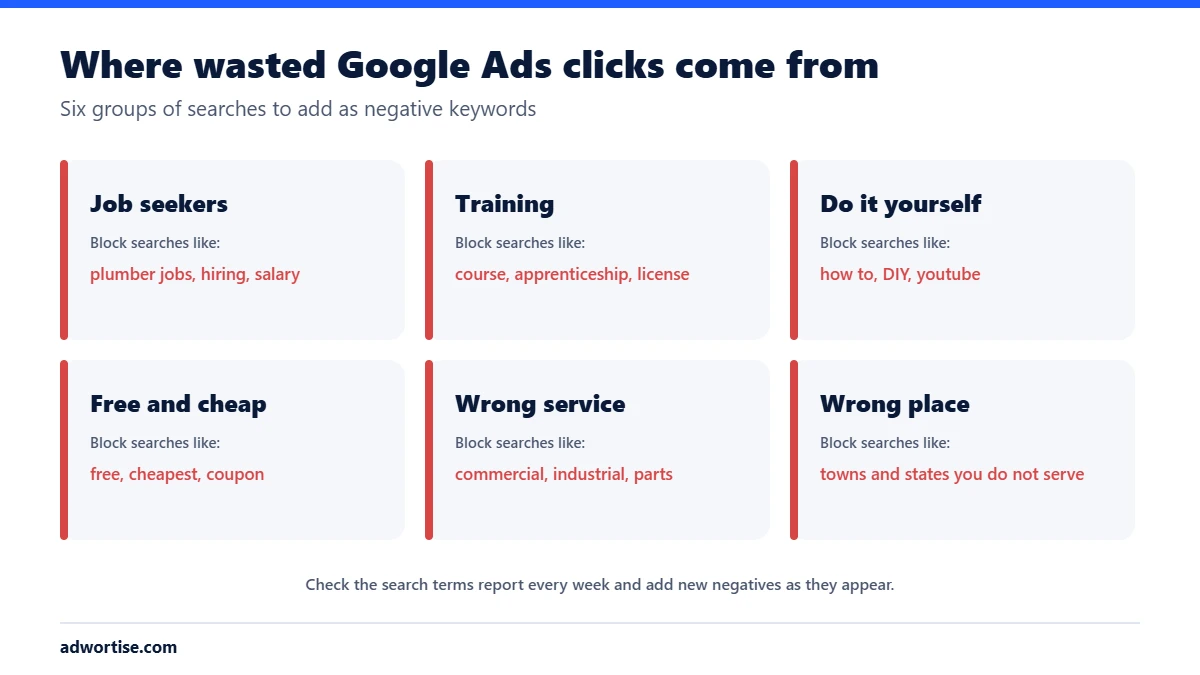
Most wasted clicks in local campaigns come from six groups of searches. Add these before the first campaign goes live.
| Group | Example negatives |
|---|---|
| Jobs and careers | jobs, job, hiring, career, careers, salary, wage, employment, vacancy, indeed |
| Training | course, courses, training, school, apprenticeship, certification, license, exam |
| Do it yourself | how to, diy, youtube, video, tutorial, guide, yourself |
| Free and bargain | free, cheapest, coupon, discount code, used, second hand |
| Wrong service | Services you do not offer, such as commercial, industrial, wholesale or parts, if you only do residential work |
| Wrong place | Towns, counties and states outside your service area, plus competitor brand names if you choose not to bid on them |
Be careful with the DIY group. “how to” blocks “how to find a good plumber” too, which is a buyer. Review what each negative would block before adding it.
How do you find new negative keywords?
- Open the search terms report. In Google Ads, go to Insights and reports, then Search terms. It lists the searches that actually triggered your ads.
- Sort by cost. Start with the searches that spent the most without converting.
- Add the word, not the whole search. If “plumber salary texas” wasted money, add “salary” as a negative, so it blocks every search with that word.
- Choose the level. Add a negative to an ad group, a campaign, or a shared negative keyword list that applies to several campaigns.
- Repeat every week for the first months, then every two to four weeks once the list settles.
Can negative keywords steer traffic between ad groups?
Yes. If one ad group is for “emergency plumber” and another for “plumber”, add “emergency” as a negative to the general group. Emergency searches then go to the ad group with the emergency ad and landing page, which improves relevance and Quality Score.
What are the common negative keyword mistakes?
- Blocking your own keywords. A negative that matches a keyword you bid on stops that keyword showing. Check for conflicts.
- Negative broad with one common word. “service” as a negative can block half your account.
- Forgetting plurals and misspellings. Close variants are not covered.
- Setting them once. New irrelevant searches appear all the time.
- Ignoring Performance Max. Check which negative keyword options your campaign types support, and apply account-level negatives where campaign-level ones are not available.
How does Adwortise manage negative keywords?
Every account Adwortise manages starts with a negative keyword list for the client’s industry and service area, and the search terms report is reviewed weekly. Wasted spend found this way is usually the first saving in a PPC audit. See Google Ads management.
Frequently asked questions
How many negative keywords should I have?
As many as your search terms report justifies. A mature local account often has a few hundred, mostly in shared lists.
Do negative keywords work on the Display Network?
They work differently there and are not guaranteed to exclude every page. Use placement and topic exclusions as well.
Should I add competitor names as negatives?
Only if you have decided not to bid on competitor searches. Some businesses bid on them on purpose.
Can negative keywords hurt my results?
Yes, if they are too broad. Check what a negative would block before you add it.