
How much does Google Ads cost?
Google Ads has no fixed price: you set the budget and pay for each click. What a click costs depends on the service and the city, and our data for 30 US cities shows medians from $7.90 to $97.74.
Key points
- Google Ads has no fixed price. You set a daily budget and pay each time someone clicks an ad.
- The price of a click is set in an auction and depends mostly on the service and the city.
- Across 30 US cities, the median click costs $7.90 for a dentist search and $97.74 for a personal injury lawyer search.
- Plan the budget backwards from the number of leads you need, not forwards from a round number.
- Ad spend and management fees are separate costs.
How much does Google Ads cost?
Google Ads costs whatever you choose to spend. There is no minimum budget and no setup fee from Google. You set an average daily budget, and you are charged when someone clicks one of your Search ads. What you pay for each click, the cost per click (CPC), is set in an auction every time a search happens.
So the useful question is not what Google Ads costs, but what a click costs in your market and how many clicks you need to get one customer. The rest of this guide answers both, with click prices from our own search data.
What decides the price of a click?
The price of a click is decided by an auction that runs each time someone searches. Google ranks the competing ads by Ad Rank, which combines your bid with the quality of your ad and landing page, the Ad Rank thresholds, the competitiveness of the auction, the context of the search and the expected impact of your assets, such as sitelinks.
Two things follow from this. A higher bid is not the only way to win a better position, because a more relevant ad and landing page raise Ad Rank too. And the price is driven by your competitors: in a service where one customer is worth thousands of dollars, many advertisers bid high, and the clicks cost more.
- Service. The value of a customer to the advertisers bidding. A personal injury case is worth far more than a dental checkup, and the clicks reflect that.
- Location. The number of businesses competing in one city. The same search can cost four times more in one city than in another.
- Ad quality. How relevant your ad and landing page are to the search. This is what Quality Score reports on.
- Timing and device. Competition changes by hour, day and device, and bids can be adjusted for each.
How much does a click cost by industry?
In our data for 30 US cities, the median Google Ads click ranges from $7.90 for a dentist search to $97.74 for a personal injury lawyer search. Home services sit in the middle: about $22 for roofing, $28 for HVAC and $38 for a plumber.
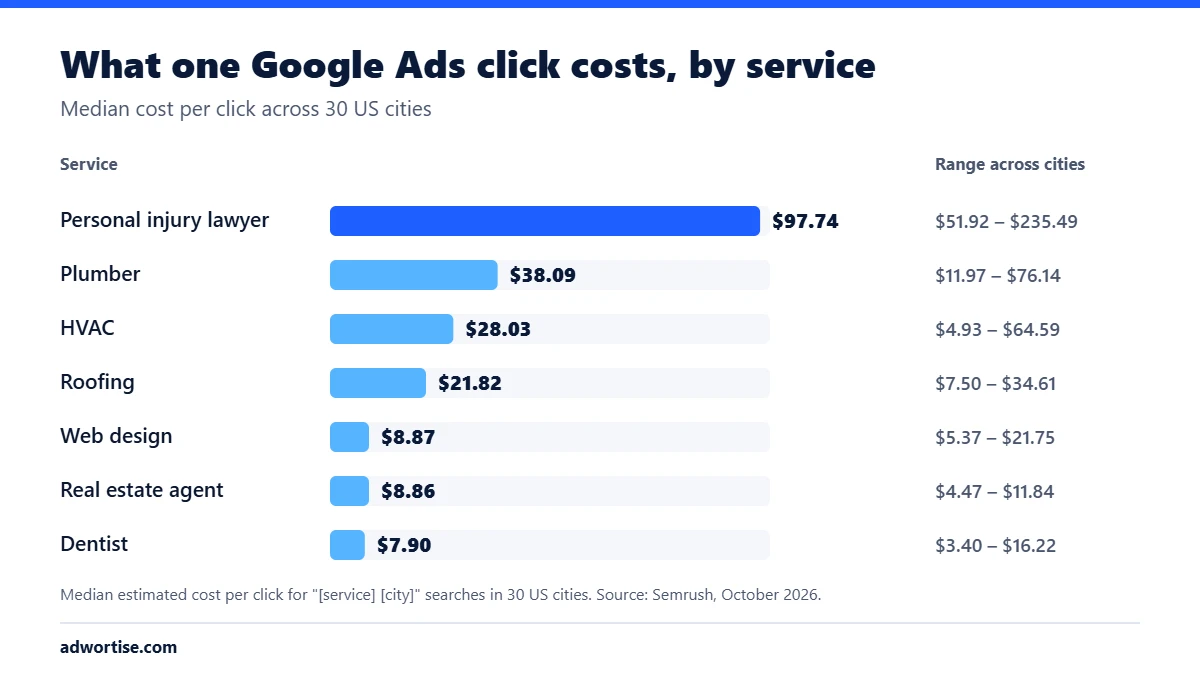
| Service | Median CPC | Lowest city | Highest city |
|---|---|---|---|
| Personal injury lawyer | $97.74 | $51.92 (Portland) | $235.49 (Denver) |
| Plumber | $38.09 | $11.97 (New York) | $76.14 (Denver) |
| HVAC | $28.03 | $4.93 (New York) | $64.59 (Denver) |
| Roofing | $21.82 | $7.50 (Washington DC) | $34.61 (Phoenix) |
| Web design | $8.87 | $5.37 (Detroit) | $21.75 (Jacksonville) |
| Real estate agent | $8.86 | $4.47 (New York) | $11.84 (Las Vegas) |
| Dentist | $7.90 | $3.40 (Charlotte) | $16.22 (Austin) |
The figures are Semrush estimates from October 2026 for searches that combine the service with the city name, such as plumber denver. Dentist figures cover the 23 cities with a cost estimate. How the data was collected, and the full figures for each city, such as Houston and Denver, are on our location pages.
Two patterns stand out. Legal clicks are the most expensive in every city we track, so a law firm needs a larger budget or tighter targeting than any other business here. And the spread inside one service is wide: an HVAC click costs about 13 times more in Denver than in New York, so a national budget split evenly across cities wastes money.
How do you set a Google Ads budget?
Set a Google Ads budget by working backwards from the leads you need. Multiply the number of leads by the cost per click, then divide by the share of clicks that become leads.
Monthly budget = leads needed × cost per click ÷ conversion rate
- Decide the number of leads. Start from the jobs you can take on in a month and how many enquiries it takes to win one.
- Look up the cost per click. Use Google Keyword Planner or the figures above for your service and city.
- Estimate the conversion rate. Use your own past results if you have them. If not, start with a cautious guess and replace it with real data after the first month.
- Turn it into a daily budget. Divide the monthly figure by 30.4, the average number of days in a month, which is how Google calculates its monthly limit.
Worked example. A plumber in a city where a click costs $38 wants 20 calls a month. If one click in ten turns into a call, 20 calls need 200 clicks. 200 × $38 is $7,600 a month, or a daily budget of about $250. If the same plumber can only spend $3,000, the plan has to change: fewer leads, a smaller area, or a better conversion rate from the landing page. These conversion figures are an example, not a forecast.
Google can spend up to twice your average daily budget on a busy day, but over a month it will not charge more than the daily budget multiplied by 30.4.
What does Google Ads management cost?
Management is a separate cost from ad spend. The ad spend goes to Google. The management fee pays for the people who research keywords, write ads, build landing pages, set up conversion tracking and adjust bids each week.
Agencies price this as a flat monthly fee, a percentage of ad spend, or a mix of both. Whatever the model, compare proposals on what is included: who owns the ad account, whether conversion tracking is set up and tested, how often the account is reviewed, and what the monthly report shows.
How can you lower your cost per lead?
You lower the cost per lead by paying for fewer wasted clicks and turning more of the remaining clicks into enquiries.
- Add negative keywords. Block searches that will never buy, such as jobs, courses or free.
- Target the area you serve. Set locations by radius or postcode, and exclude areas you do not cover.
- Use tightly themed ad groups. One service per ad group, with ads that repeat the search term. This improves Quality Score.
- Send each ad group to its own page. A page about the exact service converts better than the home page. See landing page optimization.
- Track calls and forms. Without conversion tracking, Google’s bidding cannot tell good clicks from bad ones.
- Schedule ads. If nobody can answer the phone at night, lower bids or pause ads at those hours.
What are the common Google Ads budget mistakes?
- Spreading a small budget too thin. Ten services in ten cities on $1,000 a month means a few clicks each and no usable data.
- Broad match without negatives. Broad keywords bring in searches you never meant to pay for.
- No conversion tracking. Without it you can only judge the account by clicks, which tells you little.
- Judging results in the first week. Campaigns need a few weeks of data before bids and keywords settle.
- Ignoring organic search. Ads stop the day the budget stops. SEO builds visits that keep coming.
How does Adwortise manage Google Ads?
Adwortise plans Google Ads budgets from the cost per click in each client’s city and the number of leads they need, and manages campaigns to a target cost per lead. Every account starts with a PPC audit or a tracking setup, then moves to tightly themed campaigns and weekly optimization. See Google Ads management and our pages for law firms, plumbers and HVAC companies.
Frequently asked questions
Is there a minimum budget for Google Ads?
No. Google sets no minimum budget. In practice the budget needs to buy enough clicks each month to produce leads and data, which depends on the cost per click in your market.
Do I pay for impressions or clicks?
For most Search campaigns you pay per click. Seeing the ad is free. Some other campaign types can be bought by impressions or conversions.
Why is my cost per click higher than the estimate?
Estimates are averages. Your actual price depends on your competitors in each auction, your ad quality, the time of day and the device. New accounts with no history often pay more at first.
How quickly do Google Ads bring leads?
Ads can bring visitors on the first day they run. Expect a few weeks of adjustment before the cost per lead settles.
Is Google Ads worth it for a small business?
It is worth it when a customer is worth more than the cost of winning one. Work out the budget for the leads you need with the formula above, and compare it with what those customers are worth to you.